
Paul H. · November 10, 2026
Self-Host n8n or Use n8n Cloud? A Small Business Cost Breakdown
Self-hosted n8n is free software on a $14 server. It is not free to run. Here is the monthly math against n8n Cloud at three volumes, with current prices, and the few cases where self-hosting wins.
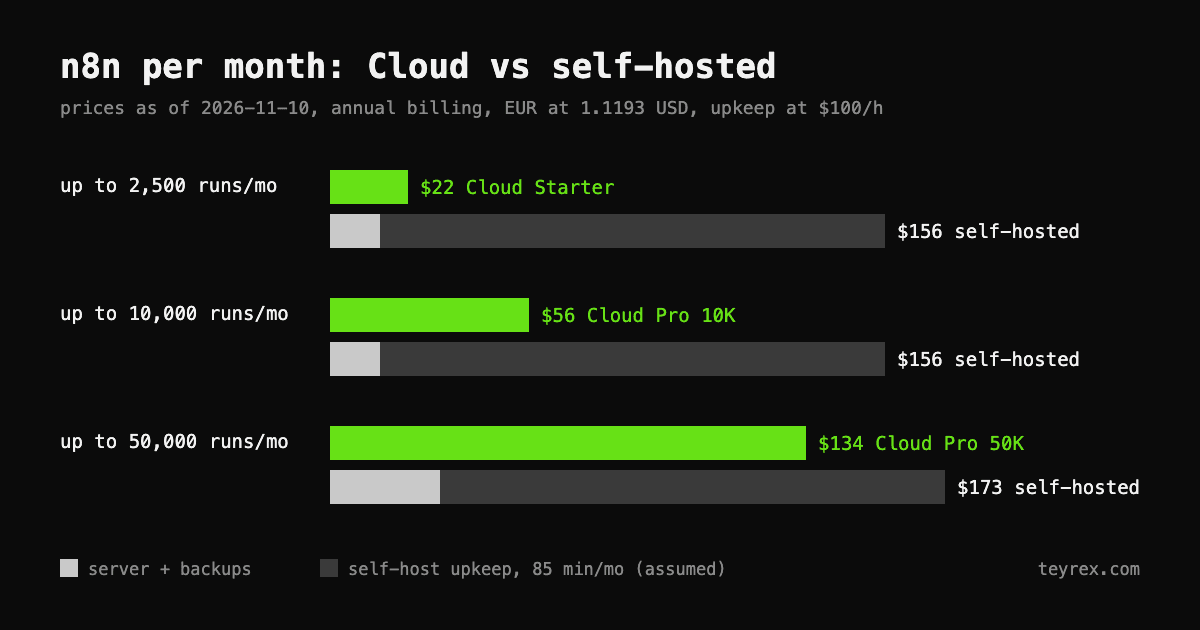
Short answer for a small business: below about 50,000 workflow runs a month, n8n Cloud is cheaper than self-hosting once you count the hours. As of November 10, 2026, Cloud costs €20 a month (about $22) for 2,500 runs and €50 (about $56) for 10,000 runs, billed annually. A self-hosted server with backups costs about $14 a month, but someone has to keep it updated and patched. At an assumed 85 minutes a month and $100 an hour, the real self-hosted total is about $156. Self-host when someone on your team already runs servers, when you outgrow 50,000 runs, or when you need something Cloud does not allow.
This is written for small business owners and operations leads who were told that n8n is free if you host it yourself. The software is free. Running it is not.
- Count runs, not steps. n8n bills per workflow execution: one complete run of a workflow, however many steps it has. A daily schedule is about 30 runs a month; a check every 5 minutes is about 8,600.
- The server is the cheap part. A 2 GB DigitalOcean droplet with weekly backups is $14.40 a month. The cost of self-hosting is the person who updates it.
- Patching is not optional. n8n published 228 security advisories on GitHub in the last 12 months, 22 of them critical. Cloud instances are upgraded for you at least every two weeks.
- The free edition is built for one person. In the self-hosted Community edition, only the instance owner and the person who created a workflow can open it. Cloud Starter includes credential sharing.
What does n8n Cloud cost in 2026?
n8n Cloud starts at €20 a month billed annually, or €24 billed monthly, for 2,500 workflow runs. The prices below are from n8n's pricing page as of November 10, 2026. Every plan includes unlimited users and workflows.
- Starter: €20 a month annually, €24 monthly. 2,500 runs, 5 runs at the same time, a 5-minute limit per run, execution logs kept for 7 days.
- Pro 10K: €50 a month annually, €60 monthly. 10,000 runs, up to 50 concurrent runs, a 40-minute limit per run, logs kept for 30 days.
- Pro 50K: €120 a month annually. The same plan with a 50,000-run allowance.
- Business: €667 a month annually. Adds SSO, Git version control and environments. Despite the name, it is self-hosted only today, so it is not a Cloud option for a small team.
At the European Central Bank reference rate of 1.1193 dollars per euro (November 9, 2026), the three Cloud tiers a small business would use come to about $22, $56 and $134 a month.
What does self-hosting n8n really cost?
The server costs $14 to $31 a month. The work around it costs more. n8n's own guide to choosing Cloud or self-hosting lists maintenance as your responsibility when you self-host, and recommends Cloud if you do not have technical expertise.
- Server. On DigitalOcean, a basic droplet with 2 GB of memory is $12 a month, and weekly backups add 20% ($2.40). For heavier use, 4 GB is $24 and daily backups add 30% ($7.20). n8n's DigitalOcean guide says a basic shared CPU plan is enough for most usage levels.
- Updates. n8n's update guide says to update at least once a month and to read the release notes for breaking changes first. n8n ships about one release a day on average, so skipping a few months turns a small update into a large jump.
- Backups that restore. A complete backup is the .n8n folder plus your database. That folder holds the encryption key, and per n8n's backup and restore docs, without the key your saved credentials cannot be decrypted. A backup that skips it brings your workflows back with every connected account unusable.
- Security patches. Between November 10, 2025 and November 10, 2026, n8n published 228 security advisories in its GitHub repository: 22 critical and 99 high. The critical ones landed on 10 separate days. One of them, CVE-2026-21858, rated 10.0, let an unauthenticated attacker read files on the server through certain form workflows in versions before 1.121.0. On Cloud, n8n upgrades every instance at least every two weeks. Self-hosted, that is your job, on n8n's schedule rather than yours.
Worked example: what does each option cost per month?
Assume $100 an hour for whoever looks after the server, whether that is a contractor or your own time. Assume one hour a month for the routine update with a backup before it, plus 30 minutes for each of the 10 critical-patch days a year. That is about 85 minutes a month, or $142. These are illustrative assumptions, not a client case; swap in your own.
- Up to 2,500 runs a month: Cloud Starter $22, self-hosted $156 ($14 server, $142 upkeep).
- Up to 10,000 runs a month: Cloud Pro $56, self-hosted $156 on the same small server.
- Up to 50,000 runs a month: Cloud Pro 50K $134, self-hosted $173 ($31 for a 4 GB server with daily backups, $142 upkeep).
Over the first year at 10,000 runs, that is $672 for Cloud against about $2,270 self-hosted, once you add an assumed 4 hours ($400) to set up the server, domain and HTTPS. The server bill is the smallest line in every scenario.
How cheap does upkeep have to be for self-hosting to win?
Cheaper than the gap between the Cloud price and the server bill. At 2,500 runs, that gap pays for 5 minutes of work a month. At 10,000 runs, 25 minutes. At 50,000 runs, about an hour. If one update and one backup check take longer than that, Cloud is the cheaper option.
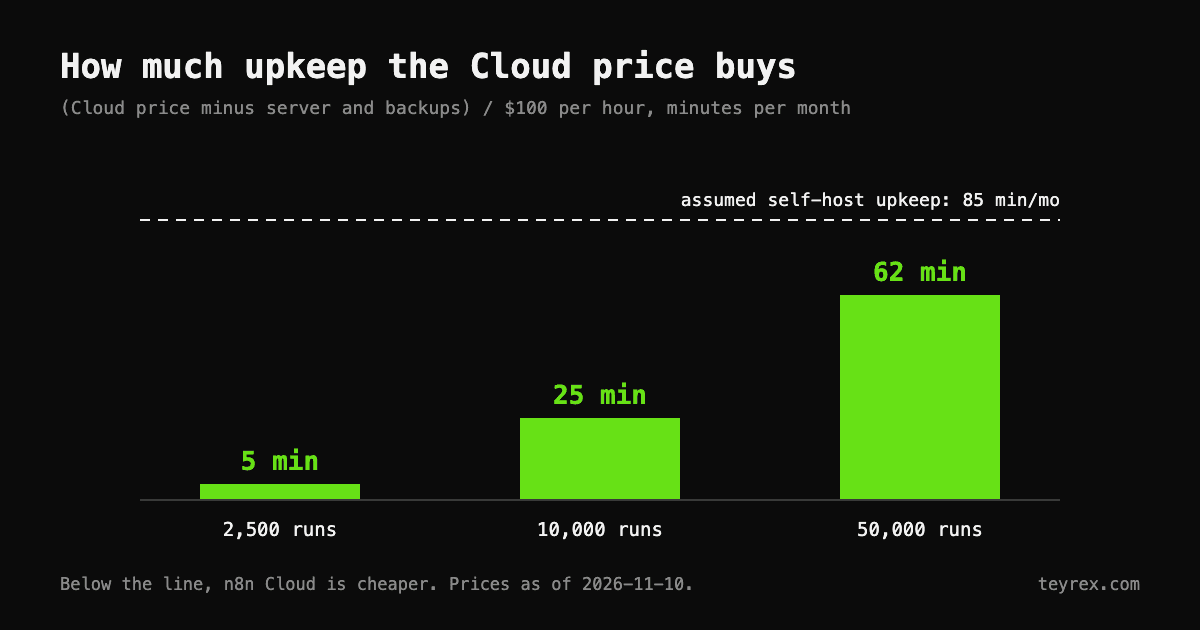
The math flips for one kind of business: one where someone already runs servers. If your developer already patches other machines every month, adding n8n might cost 15 minutes rather than 85, and self-hosting at 50,000 runs then saves about $78 a month. If the person doing the updates is you, the founder, price your hour at what it is worth to the business, not at zero.
When is self-hosting n8n the right call?
When the Cloud plan cannot do what you need, or when volume makes the hours worth it. The main cases:
- You need features Cloud does not offer. Custom nodes and bash scripts are available only on self-hosted n8n, per the comparison table on the pricing page.
- Your runs are long. Cloud caps a single run at 5 minutes on Starter and 40 minutes on Pro.
- Data location is a contract requirement. n8n Cloud stores data in Frankfurt, Germany. If a client contract says your data stays somewhere else or on your own servers, self-host.
- You run well past 50,000 runs a month. Above that, Cloud moves to a custom plan, while the free Community edition does not charge per run.
One limit to know first: n8n's Sustainable Use License allows internal business use, but not offering n8n to your own customers so they can connect their accounts and build workflows. Running automations for your own business is fine.
What does the free self-hosted edition leave out for a team?
Sharing. In the Community edition, only the instance owner and the user who created a workflow or credential can access it, per n8n's edition comparison. If two people in your company build automations, they cannot open or fix each other's work without the owner account. Cloud Starter includes credential sharing and one shared project, and Pro has three. Self-hosted, sharing starts with the Business plan at €667 a month. Registering the Community edition with an email is free and adds folders and debugging tools, but not sharing.
If you do self-host, what is the minimum setup?
- Store the encryption key in your password manager on day one, and keep a copy of the .n8n folder off the server.
- Pin the n8n version instead of running latest, then back up and update on a fixed monthly date.
- Watch n8n's security advisories on GitHub so a critical fix reaches you the day it is published, not at the next monthly update.
- Set up an error workflow so failed runs alert someone. Our guide to n8n error handling walks through it.
- Keep only the public webhooks and forms you use. For the CVE above, n8n's only interim advice was to restrict or disable public webhook and form endpoints until upgrading.
How do you decide in 10 minutes?
Count your runs and price the Cloud tier first. Then be honest about who will maintain a server.
- Count runs. If you already use n8n, the Insights dashboard shows production runs. If not, list each workflow and how often it triggers: daily is 30 runs a month, hourly about 730, every 5 minutes about 8,600.
- Price the tier from the list above, using annual billing once you are past the trial.
- Write down who updates the server and what their hour costs. If the answer is nobody yet, the answer is Cloud.
To check whether the workflows themselves pay for their hosting, run your numbers through our Return on Tokens calculator. If you are still choosing a platform, our n8n vs Zapier comparison comes before the hosting question. If you want n8n built and maintained on either option, that is what our n8n automation team does.