
Paul H. · October 6, 2026
n8n Error Handling for Small Businesses: Stop Silent Failures
Most small business n8n workflows have no alerting. When one breaks, nobody finds out until a customer does. The minimum setup, what each n8n error feature actually catches, and what a silent failure costs.
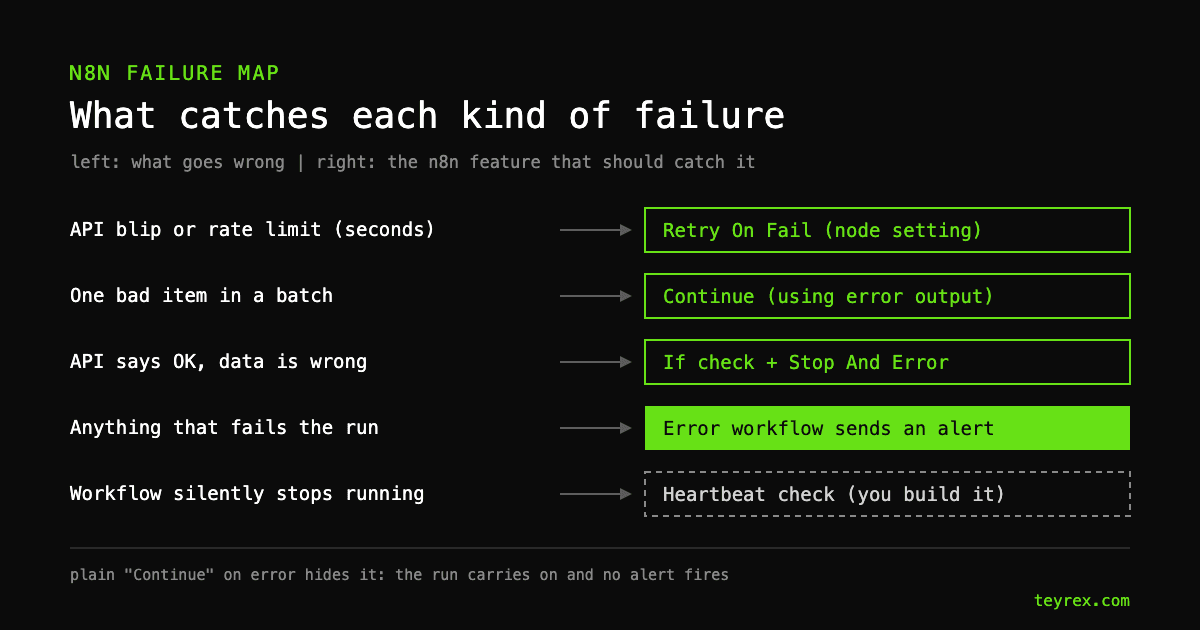
The short answer: give every production n8n workflow an error workflow that sends an alert, turn on Retry On Fail only for nodes that call outside services, send bad items to an error output instead of ignoring them, and add checks that fail the run on purpose when an API returns "success" with the wrong data. In our experience that takes a developer 2 to 4 hours for a handful of workflows. Skip it, and the cost of a failure is set by how long nobody notices. On n8n Cloud Starter, the failed execution data you would need to recover is kept for 7 days at most.
- Retries cover seconds, not outages. n8n caps Retry On Fail at 5 tries with at most 5 seconds between them, about 20 seconds of waiting in total.
- Plain "Continue" hides errors. The run carries on with the last valid data and no alert fires.
- An error workflow is the one thing every workflow needs. It takes about 15 minutes to build and one setting to attach.
- Time to detection sets the bill. In the example below, a broken lead workflow puts $36 at risk with a 1-hour alert and over $4,000 when someone notices after 5 days.
Everything here was checked against the n8n docs and n8n 2.41, the latest release as of 2026-10-06.
Why do n8n workflows fail without anyone noticing?
Because a failed n8n execution only shows up in the Executions list unless you tell n8n to do something else, and nobody at a 15-person company reads that list. These are the common ways a workflow breaks quietly:
- Nobody is told. The execution fails, n8n records it, and no alert goes anywhere because no error workflow is set.
- The error is swallowed. A node set to On Error: Continue passes the last valid data along, so the run keeps going and nothing looks failed.
- The API says success. A service returns a normal response with an empty list or an error message inside the body. To n8n that is a node that worked.
- The workflow stops running. Someone unpublishes it, or the upstream system stops sending webhooks. A workflow that never runs never fails, so no error handling inside it can help.
What is the minimum error handling setup for a production n8n workflow?
Five settings, in order of value. The first one is not optional.
- An error workflow with an alert. Create a workflow that starts with the Error Trigger node and sends a message to Slack, email, or wherever your team actually looks. Attach it under Error Workflow in each workflow's settings. One error workflow can serve all of them.
- Save failed production executions. Keep this workflow setting on Save. It is what lets you open a failed run, see its data, and retry it from the Executions list.
- Retry On Fail on nodes that call outside services. HTTP requests, CRMs, email providers, AI models. Be careful on nodes that create records: if the first attempt timed out after the record was written, a retry can create a duplicate.
- Checks that fail on purpose. After any node whose output matters, add an If node that confirms the result looks right (an ID came back, the list is not empty) and send the false branch to a Stop And Error node. A quiet bad result becomes a failed run, and the failed run triggers the alert.
- A heartbeat for scheduled and webhook workflows. A small second workflow on a schedule that checks the expected result happened, for example at least one new lead in the CRM since yesterday morning, and alerts if not. This is the only item on the list that catches a workflow that stopped running.
How does Retry On Fail work, and what are its limits?
With Retry On Fail on, n8n reruns a failed node up to Max. Tries times, waiting Wait Between Tries milliseconds between attempts. The defaults are 3 tries and 1,000 ms. The limits are not in the settings docs, but they are in n8n's execution engine source: tries are clamped between 2 and 5, and the wait between 0 and 5,000 ms. The most patient setting possible waits about 20 seconds in total, across 4 gaps.
That is the right tool for a rate limit or a brief 502 from an API. It does nothing for an expired password or a provider that is down for an hour. Those need a person, which means they need an alert. If a provider needs longer pauses, for example a per-minute rate limit, build the wait yourself with a Wait node, or catch the failed items on the error output and process them on the next scheduled run.
When should you use "Continue (using error output)" instead of stopping?
When one bad item should not stop the other 499. Each n8n node has three On Error choices in its settings. Stop Workflow halts the run. Continue passes the last valid data to the next node. Continue (using error output) sends the failed item down a separate branch with the error details attached.
For a batch job, such as syncing 500 invoices into your accounting tool, the error output is the right choice. Connect that branch to something a person will see: a row in a "needs attention" sheet plus a message. Plain Continue is rarely right on a node whose output matters. It is how a workflow ends up running "successfully" for weeks while writing blank records.
How do you set up and test an n8n error workflow?
Create a workflow with the Error Trigger as the first node, add a node that sends the alert, save it, then pick it under Error Workflow in the settings of every production workflow. Per n8n's error handling docs, the Error Trigger receives the workflow name, the last node that ran, the error message, and a link to the failed execution. Put all four in the alert so whoever reads it can click straight to the problem.
Three details from the Error Trigger node docs catch people out:
- The error workflow does not need to be published to work.
- You cannot test it by running a workflow manually in the editor. The Error Trigger only fires when an automatic execution fails. To test, publish a throwaway workflow with a Schedule Trigger and a Stop And Error node, let it run once, confirm the alert arrives, then unpublish it.
- If the failure happens in the trigger node itself, the execution never starts, so the alert has no execution link. Write the message so it still makes sense without one.
What does a silent n8n failure cost?
Roughly: items per hour, times hours until someone notices, times what each item is worth. This is an illustrative example, not a client case. A service business gets 30 website leads a week, and an n8n workflow pushes them into the CRM. On a Friday evening the CRM connection expires. About one lead in ten becomes a customer worth $2,000.
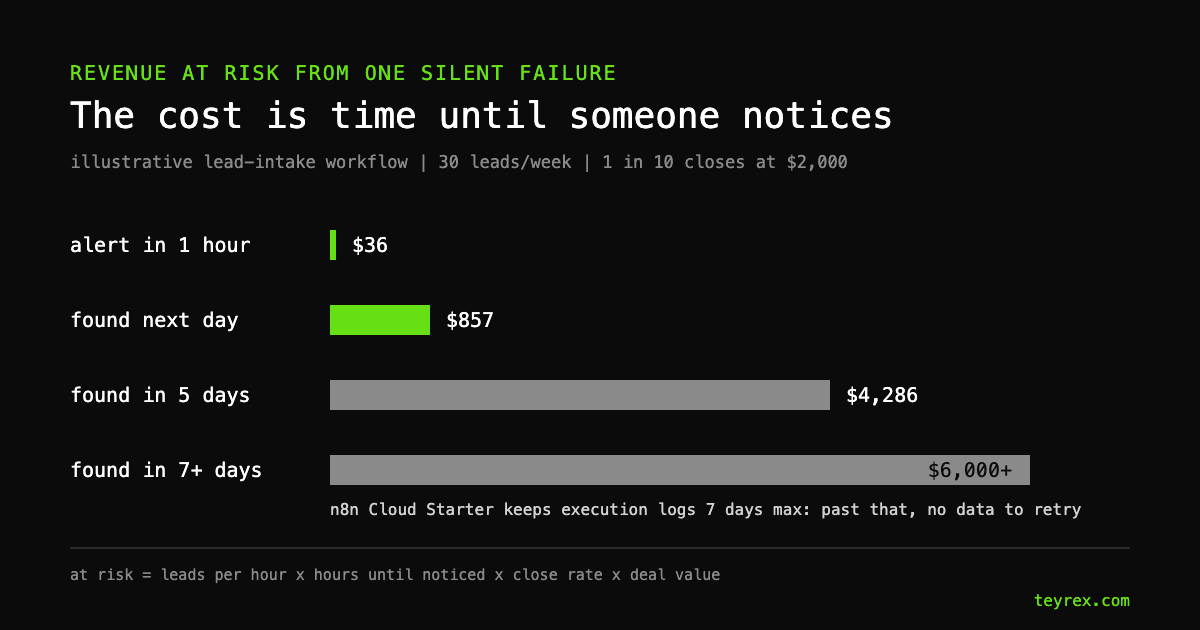
With an alert, someone reconnects the CRM within the hour and retries the failed runs, and about $36 of pipeline was ever at risk. Found the next day, it is about $857. Found after 5 days, about 21 leads worth $4,286 in expected revenue sat in failed executions, getting colder. Past a week there is a second problem: n8n Cloud Starter keeps execution logs for 7 days at most (30 days on Pro, as of 2026-10-06), so the failed runs, and the lead data inside them, may be gone before anyone looks.
Against that, the setup above costs 2 to 4 developer hours, or $200 to $400 at $100 per hour. It is the same lesson as our AI automation ROI worksheet: maintenance and error rework are real lines in the budget, and they get bigger when nobody is watching.
Should you set this up yourself or pay someone?
If you built the workflows yourself, build the error workflow yourself this week. With the docs open it is a 15-minute job. Bring in help when workflows touch money or customer data, or when nobody on the team can say which ones are still running. Our n8n development projects start around $5,000 for simple workflows, and we offer ongoing support with proactive monitoring for workflows already in production. If you are still choosing a platform, our n8n vs Zapier comparison includes how each one handles errors and retries.