
Paul H. · October 13, 2026
Is Your Cursor or Lovable App Safe to Launch? A Founder's One-Hour Check
Your AI-built app works on your laptop. Before real users and real money arrive, run five checks you can do yourself in about an hour, and know which one needs a developer.
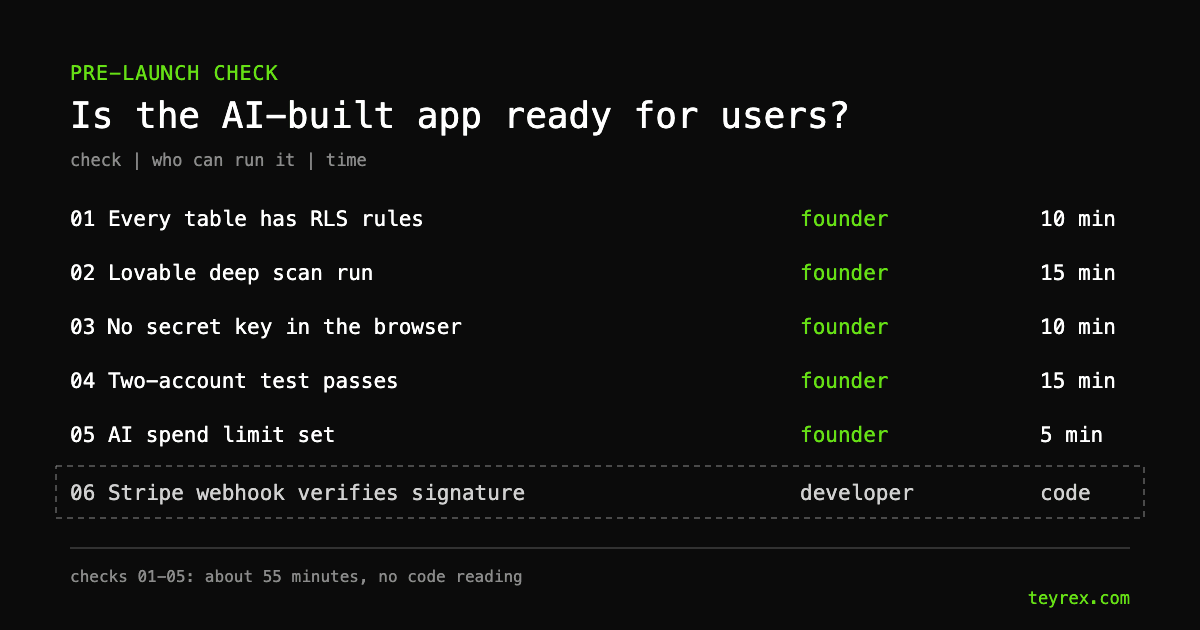
Often not yet, and as a founder you can find out which in about an hour without reading code. An app built with Cursor, Lovable, or Bolt is ready for real users when every database table has access rules, no secret key ships to the browser, one user cannot open another user's records, your AI provider has a spend limit you can afford to lose, and payments are confirmed by Stripe's signed webhooks instead of by the browser. You can check the first four from dashboards and a browser. The payment check, and everything a dashboard cannot see, needs someone who reads code: our fixed-price audit starts at $1,400, with a report from 3 days.
- The Supabase key in your browser is supposed to be public. Supabase says the publishable key only reaches what Row Level Security allows. A table without RLS is the actual hole, and Supabase's own Security Advisor marks it as an error.
- This has happened at scale. CVE-2025-48757 (CVSS 9.3, critical) describes Lovable-generated sites where insufficient RLS let unauthenticated visitors read and write database tables.
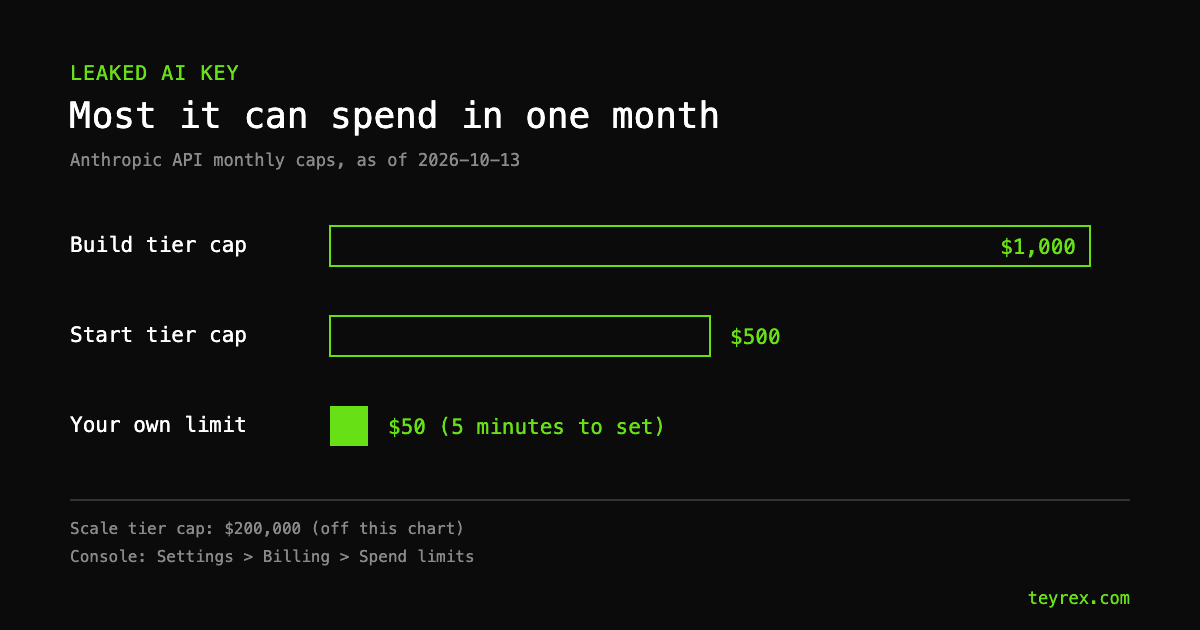
- A leaked AI key is a billing problem first. On Anthropic's entry tier a stolen key can spend up to $500 in a month before the tier cap stops it. A $50 custom limit takes five minutes and caps the loss at $50 (as of 2026-10-13).
- Passing these checks means no known open doors, not "secure". Rate limiting, injection, and API routes that skip auth need a code review.
Why does "it works" not mean "it is safe to launch"?
Because AI coding tools build what the prompt asks for, and a demo prompt asks for a login page and a dashboard, not for rules about who may read which row. The app works for you because you are its only user. The problems appear with the second user, who can see the first user's data, or with the first stranger who opens the browser's developer tools. In our audit data from 35 AI-built apps, the most common gaps were invisible from the app's own screens. That is why the checks below go around the app, through the dashboards behind it.
Check 1: does every database table have access rules? (10 minutes)
Open your Supabase project, go to Advisors, then Security Advisor. A pass is zero items marked ERROR. The one that matters most is "RLS disabled in public" (lint 0013), which the Supabase advisor docs summarize as "Table publicly accessible": anyone with your project URL can read, change, and delete that table. If you are not sure your app uses Supabase, ask the AI tool that built it which database it set up.
Do not panic about the key itself. The Supabase API key docs say the publishable (formerly anon) key is safe to expose in a web page because Row Level Security decides what it can reach, and they tell you to enable RLS on every table before you deploy. The secret key (formerly service_role) is the opposite: it bypasses every RLS policy and must never reach the browser. One more trap: RLS switched on with a policy that lets everyone through is the same hole with a green light next to it.
This is not a theoretical risk. CVE-2025-48757, published May 2025 and rated 9.3 out of 10, covers insufficient RLS in Lovable-generated sites through April 15, 2025. The researcher's write-up lists exposed names, emails, third-party API keys, and payment status fields that could be changed. Lovable disputes the CVE on the grounds that each customer is responsible for protecting their own app's data. Whoever is right about the label, that sentence is the part to remember: the data is yours to protect.
Check 2: if you built on Lovable, did you run the deep scan? (15 minutes)
Lovable runs a quick scan automatically every time you publish. Per Lovable's security docs, it covers database rules, known vulnerabilities in npm packages, and MCP servers exposed without authentication. The deep scan is the one that reads your application code for access control, unauthenticated endpoints, injection, leaked secrets, and payment logic, and it does not run on its own. Start it from the Security view before launch. Workspace admins can also turn on "Block publishing with critical issues".
Lovable is candid about the limit: the docs say these tools cannot guarantee complete security and recommend a professional review for apps handling sensitive data. If you built in Cursor or Bolt, do not assume any scan ran. Ask whoever set up the project, and if nobody knows, treat the answer as no.
Check 3: is a secret key sitting in your browser bundle? (10 minutes)
Open your live site in Chrome, open DevTools, and press Cmd+Option+F (Ctrl+Shift+F on Windows) to search every file the page loaded. Search for sk_live, rk_live, service_role, and the word secret. Keys that start with pk_live are Stripe publishable keys and are meant to be public, per Stripe's key docs. A hit on any of the others is a launch blocker.
If you find one, rotate it in the provider's dashboard today, then move the call that uses it to a server function. Deleting the line from the code does not help: the old key is already in every copy of the bundle that was ever downloaded, and only rotation revokes it.
Check 4: can one user open another user's data? (15 minutes)
Run the two-account test. Create two test accounts, A and B. Logged in as B, create something private, such as an order or a note. Copy the URL of that record. Log out, log in as A, and paste the URL. Then try it again logged out. A pass is an error or an empty page both times. If you see B's data, you have the most common web vulnerability there is: Broken Access Control is number one on the current OWASP Top 10:2025.
This test catches the visible version of the problem. It does not catch an API route that skips the check when called directly, which is the more common version in AI-built code and the reason the last section exists.
Check 5: what is the most a leaked AI key can cost you this month? (5 minutes)
Without a limit you set yourself, the answer is your provider's tier cap. As of 2026-10-13, Anthropic's published caps are $500 a month on the Start tier, $1,000 on Build, and $200,000 on Scale. You can set your own lower limit in the Claude Console under Settings, then Billing, and requests stop when it is reached. OpenAI lets you set spend limits per project and email alerts on its limits page.
Set the limit at two to three times your real monthly usage. If your app spends $15 a month on tokens, a $50 limit means a stolen key costs you $50, not $500 or $1,000. Yes, the limit also stops your own app if usage spikes. That is the trade you want: an outage email at 9 a.m. is cheaper than a surprise invoice. Our AI cost estimator gives you a usage baseline if you have no history yet.
Which check needs a developer?
Payments. If your app takes money through Stripe, the paid status must be set by a webhook that verifies the Stripe-Signature header, never by the browser landing on a success page. Stripe's webhook docs are blunt about why: without verification, an attacker can send fake events that fulfill orders or grant account access. You cannot see this from a dashboard. Ask your developer, or the AI tool, two questions: show me the line where the webhook verifies the Stripe signature, and show me where the paid status is set. If the second answer is the success page, do not launch.
What will an hour of checks not tell you?
- Whether every API route checks who is calling. The two-account test covers pages, not each endpoint behind them.
- Whether user input reaches database queries unsafely (Injection, A05 on the 2025 list).
- Whether anything limits how often someone can hit your signup, login, or AI endpoints. Without rate limiting, your spend limit becomes the only brake on a token bill.
- Whether errors fail open or leak internals. OWASP added Mishandling of Exceptional Conditions as A10 in 2025.
These were among the most frequent findings in our audit data, and none of them show up in a dashboard. They are found by reading code.
So, do you launch?
If all five checks pass and the app does not take payments or hold sensitive data, launch, keep the spend limit, and rerun the checks whenever you add a table or a feature that touches user data. If check 1, 3, or 4 fails, fix it before anyone signs up; it is often a short fix once someone finds the right table or route. If the app takes money or stores health or financial records, get a code review first. Ours is a fixed-price audit from $1,400 with a report from 3 days, and full remediation, when needed, typically runs $10,000 to $40,000. Not sure where you stand? The free code health check sorts your app into a risk category in a few minutes.